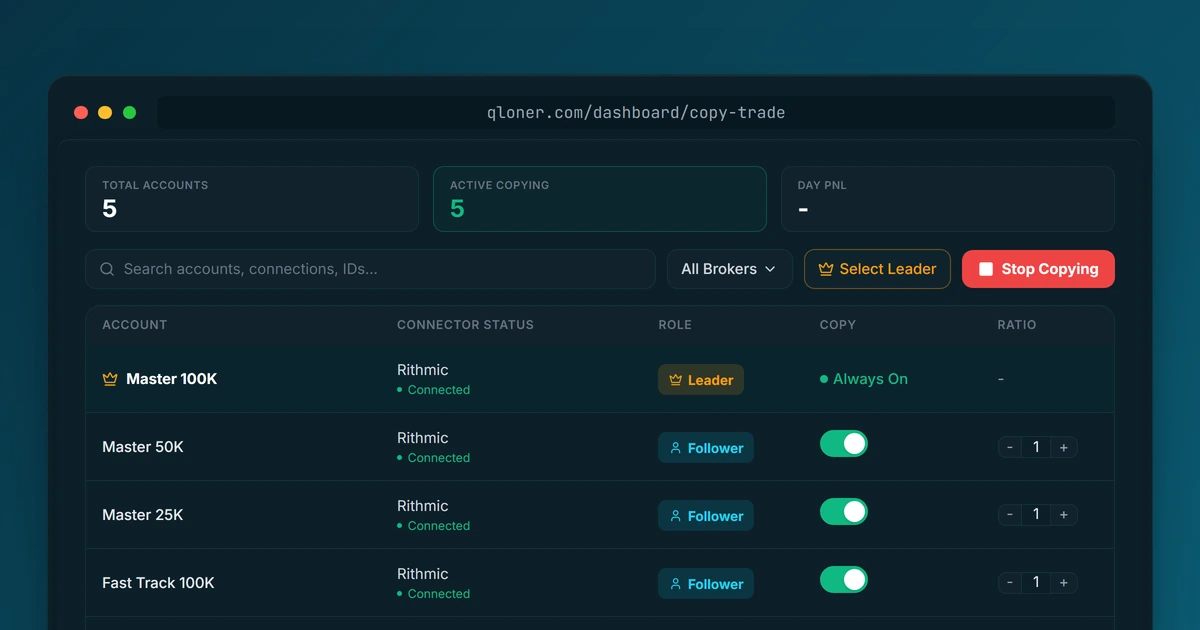
Running several Bulenox accounts means placing the same trade several times, and sooner or later getting one of them wrong. With Qloner you trade one account and the others follow in real time, each at its own size, with its own daily loss limit and profit target.
One step comes first. Bulenox permits trade copiers, but its rule covers tools a trader built for personal use, and Qloner is a commercial product. Ask Bulenox for approval in writing before you connect an account. The rule is quoted below, with what to ask for.
What Qloner does for Bulenox traders
You keep trading the way you already do, on one account. Qloner mirrors the orders you place there to your other accounts, and it never places a trade of its own.
- One entry, every account: a trade on your leader reaches each follower in real time.
- A copy ratio per follower, so a smaller account and a larger one each take the right size.
- A daily loss limit and a daily profit target on every follower, set by you.
- One follower hitting its limit is flattened and locked for the day. The rest keep copying.
- A log of every copied order, so you can see what went to each account and when.
Before you connect: get Bulenox's approval
Bulenox's FAQ says "Bots, algorithms and trade copiers are permitted," then limits that to "user-built tools intended solely for the account owner's personal use." It adds: "Commercial, shared, rented or publicly distributed automation tools are not allowed."
Qloner is a commercial product, so that permission does not cover it on its own. Bulenox's Terms of Use give the route: "any third party algorithms must be approved from the Bulenox management team." Here is how to ask.
- 1Message Bulenox support and name the tool: Qloner, a trade copier that mirrors your own manual trades between your own Bulenox accounts.
- 2Ask for approval in writing.
- 3Connect only after you have a clear yes, and keep the reply.
Don't skip this. Bulenox's Terms of Use say it may "restrict or limit or terminate account(s) for any reasons at any time without prior notice," so an unapproved commercial copier puts the account and any payout at risk.
Bots, algorithms and trade copiers are permitted. ... Only user-built tools intended solely for the account owner's personal use are permitted. Commercial, shared, rented or publicly distributed automation tools are not allowed.
Source: Bulenox FAQ
- Account limit
- up to 5 Master-level accounts (Master, Fast Track and Momentum Master combined), with no cap on Qualification accounts
- Last verified
- only tools you built yourself, for your own use, are permitted
- commercial, shared, rented or publicly distributed tools are not allowed
- Bulenox's Terms of Use require its management team to approve any third-party algorithm
- one Bulenox profile and one Rithmic User ID per trader
Matching Bulenox's limits in Qloner
Bulenox's help center lists two Qualification options, a trailing drawdown account and an EOD account. Look up the loss rules for each account's own plan there, then set Qloner's limits inside them.
- Set the daily loss limit for each follower a little inside whatever loss limit or drawdown Bulenox applies to that account - this is your own stop, not Bulenox's rule.
- Add a daily profit target where you want that account to stop for the day.
- Set each follower's copy ratio for its own size, not the leader's.
If one follower hits its limit, Qloner flattens and locks that account for the day while the others keep copying.
Connecting Bulenox Rithmic accounts
Setup takes a few minutes once Bulenox has said yes. Bulenox runs on Rithmic, and its help center says "Every account is linked to the same Rithmic User ID," so one login brings in your accounts.
- 1In Qloner, add a Rithmic connection with your Rithmic username and password, and choose Bulenox in the Prop / Broker dropdown.
- 2Pick the account you actually trade as your leader and add the others as followers.
- 3Set each follower's copy ratio and limits, then switch its Copy toggle on. Don't place trades straight into a follower.
Frequently Asked Questions
Bulenox's FAQ says "Bots, algorithms and trade copiers are permitted," but limits that to "user-built tools intended solely for the account owner's personal use." It adds that "Commercial, shared, rented or publicly distributed automation tools are not allowed." A commercial copier needs Bulenox's approval first.
More posts